Vitrine
A developer's portfolio as a dark room lit only by the work — each project's screen throws its own measured light, and the page takes its colour from whichever is lit.
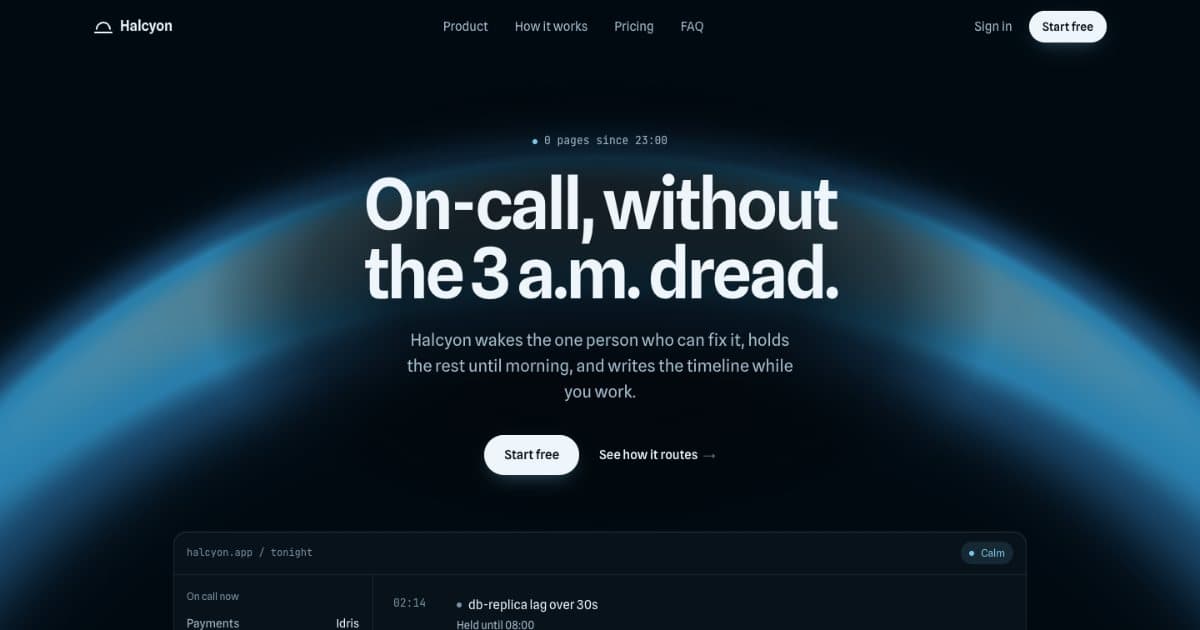
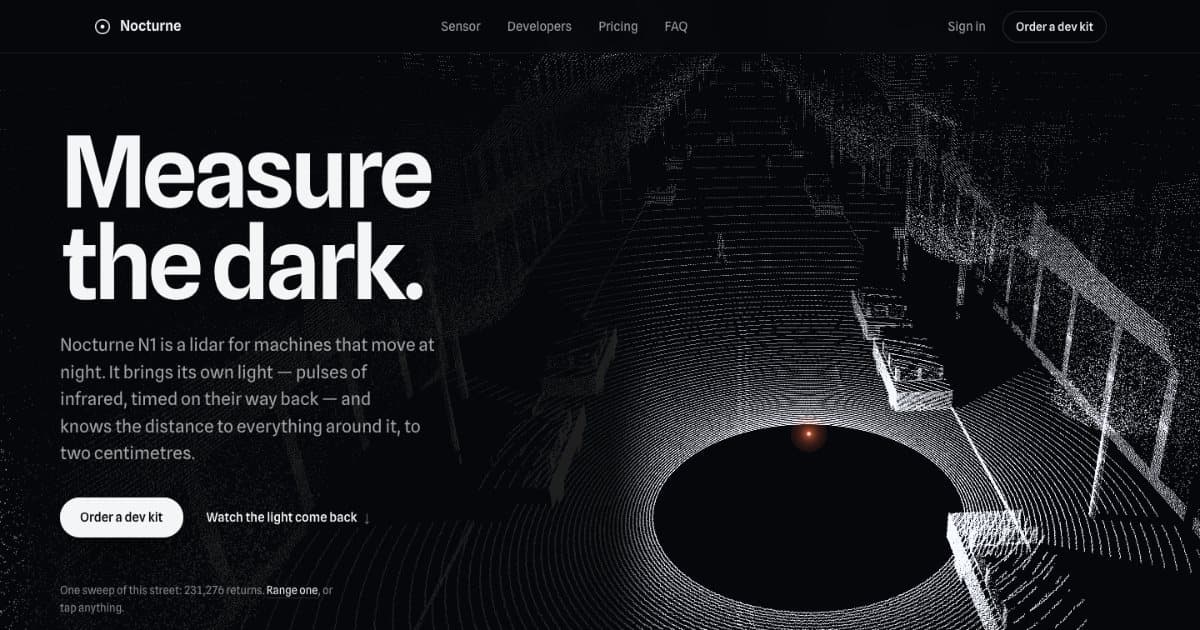
A developer's portfolio as a dark room with no lamps in it: the only light on the page comes from the work. Each project is a screen; the one you've scrolled to is lit, and its light falls on the floor below it in the work's own colour — coral from Nocturne's rings, blue from Halcyon's horizon — while the others rest dim. That colour is the page's one accent too, on the mark in the nav and the lit project's number. None of it is chosen: a small script measures each screenshot's light the way Iris's catalogue measures every piece. It ends on an empty frame, numbered like the next project, that wakes to plain white: the visitor's.
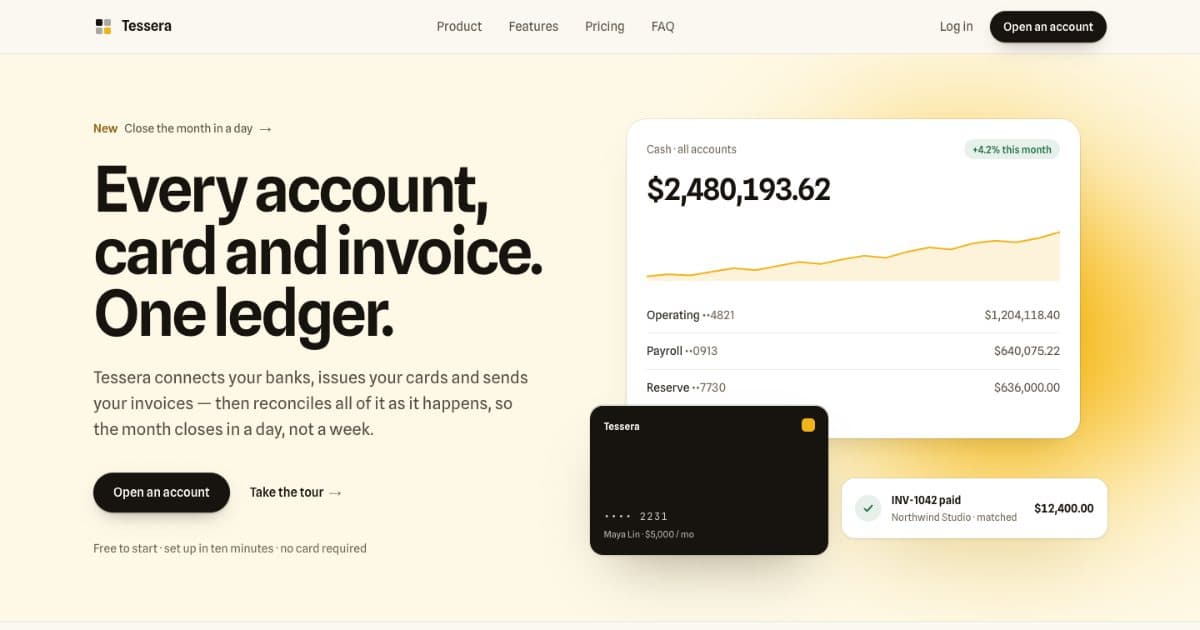
Everything else is the category's standard order in one typeface and three strengths of white — nav, hero, three projects, about with one quote, questions, the close, footer — with a lot of dark between them. Only light moves, and only with the scroll: CSS scroll-driven animations on opacity, no WebGL and no scroll capture; under reduced motion, or where scroll-driven animations aren't supported, every screen is lit. Make it yours in work.ts: add your screenshots (a desktop and a phone capture of each project — they aren't part of the code), run measure.mjs, and the page relights in your work's colours. The work shown is three of Iris's own templates, running; the person, the dates, the prices and the quote are placeholder copy — replace them, or remove the quote.
Details
- Kind
- Portfolio
- Stack
- React · TypeScript
- Depends on
- Nothing
- Licence
- Free
- Added
- 29 Sep 2026
- Tags
- portfolio, developer, scroll, measured-light, no-webgl, faq
Its light
- 1%
- 15%
- 71%
- 9%
- 4%
Code
Install
No installation needed — self-contained, paste-in code.
Usage
import { VitrineLanding } from "./vitrine/VitrineLanding";

// The whole page. Put your screenshots where work.ts points (a desktop and a
// phone capture of each project), run measure.mjs on them so the page takes
// their light, then drop it into a route.
export default function Page() {
  return <VitrineLanding />;
}
Component
The real source, exactly as it ships — multiple files, kept together.
import type { CSSProperties, ReactNode } from "react";
import { ABOUT, CLOSE, PERSON, QUESTIONS, WORK, type Project } from "./work";
import { CopyEmail, VitrineLight } from "./VitrineLight";
import "./vitrine.css";

/**
 * Vitrine — a developer's portfolio, from Iris's Templates.
 *
 * A dark room with no lamps in it: the only light on the page comes from
 * the work. Each project is a screen; the one at the middle of the view is
 * lit and its light falls on the floor below it, in the work's own colour,
 * while the others rest dim. The page's one accent is that colour. It ends
 * on an empty frame, numbered like the next project, that wakes to plain
 * white — the visitor's.
 *
 * None of that light is chosen: `measure.mjs` reads it from each
 * screenshot into `light.json`. Replace the screenshots and the copy in
 * `work.ts`, run the script, and the page relights in your work's colours.
 *
 * The structure is the category's own — nav, hero, work, about, questions,
 * close, footer — so it's used without being learned. Text never animates;
 * only light does. The light follows the scroll with CSS scroll-driven
 * animations (opacity, on the compositor); `VitrineLight` wakes the first
 * screen once its picture is in and hands the accent from room to room.
 * Without it, or under reduced motion, every screen is lit.
 */

const NAV = [
  { label: "Work", href: "#work" },
  { label: "About", href: "#about" },
  { label: "Questions", href: "#questions" },
];

const mailto = `mailto:${PERSON.email}?subject=${encodeURIComponent("A project")}`;
const pad = (n: number) => String(n).padStart(2, "0");

/** A tiny screen, filled with the light of whichever work is lit. */
function Mark() {
  return <span aria-hidden="true" className="vt-mark" />;
}

function Primary({ children, small = false }: { children: ReactNode; small?: boolean }) {
  const size = small ? "h-9 px-4 text-[0.875rem]" : "h-11 px-5 text-[0.9375rem]";
  return (
    <a href={mailto} className={`vt-primary inline-flex shrink-0 items-center rounded-full font-medium ${size}`}>
      {children}
    </a>
  );
}

/* ---- nav ------------------------------------------------------------ */

/* No phone menu: it's one page, read top to bottom, and its one action is
   in the bar at every width. */
function Nav() {
  return (
    <header className="vt-nav fixed inset-x-0 top-0 z-30">
      <nav aria-label="Main" className="vt-wrap flex h-16 items-center justify-between gap-4">
        <a href="#top" className="vt-brand flex items-center gap-3 text-[1.0625rem] font-semibold tracking-[-0.01em] whitespace-nowrap">
          <Mark />
          {PERSON.name}
        </a>
        <ul className="hidden items-center gap-9 text-[0.9375rem] text-[color:var(--vt-dim)] md:flex">
          {NAV.map((n) => (
            <li key={n.href}>
              <a href={n.href} className="vt-link">
                {n.label}
              </a>
            </li>
          ))}
        </ul>
        <Primary small>Start a project</Primary>
      </nav>
    </header>
  );
}

/* ---- hero ------------------------------------------------------------ */

/* Two columns when either the column is wide enough or the window is — the
   column narrows with the window's height, and a short laptop window
   shouldn't lose the split. */
function Hero() {
  return (
    <section id="top" aria-labelledby="vt-title" className="vt-wrap @container pt-[clamp(6.5rem,14vh,8.5rem)]">
      <div className="grid grid-cols-1 gap-x-10 gap-y-6 @3xl:grid-cols-12 @3xl:items-end lg:grid-cols-12 lg:items-end">
        <h1
          id="vt-title"
          className="text-[clamp(2.75rem,9cqi,5.25rem)] leading-[0.95] font-semibold tracking-[-0.045em] text-balance @3xl:col-span-7 @3xl:text-[clamp(3rem,8.4cqi,5.25rem)] lg:col-span-7 lg:text-[clamp(3rem,8.4cqi,5.25rem)]"
        >
          Screens worth leaving on.
        </h1>
        <div className="@3xl:col-span-5 @3xl:pb-1.5 lg:col-span-5 lg:pb-1.5">
          <p className="max-w-[36ch] text-[1.0625rem] leading-[1.5] text-pretty text-[color:var(--vt-dim)]">
            I’m {PERSON.name}, a developer in Lisbon. I design and build websites and product interfaces, end to end.
          </p>
          <div className="mt-6">
            <Primary>Start a project</Primary>
          </div>
        </div>
      </div>
    </section>
  );
}

/* ---- the work ---------------------------------------------------------- */

/** A work's light, as its room reads it: the colour, and how much of it. */
function lightVars(light: Project["light"]) {
  return {
    "--vt-accent": light.accent,
    // A bright page lights the room more than a dark one.
    "--vt-level": (0.3 + 0.45 * light.level).toFixed(3),
  } as CSSProperties;
}

/** Which work, what it is, what it's made with — a label, so the screen is what's looked at. */
function Caption({
  n,
  name,
  title,
  titleId,
  line,
  meta,
  after,
  heading: Heading = "h3",
}: {
  n: number;
  name?: string;
  title: string;
  titleId: string;
  line: string;
  meta?: ReactNode;
  after?: ReactNode;
  heading?: "h2" | "h3";
}) {
  return (
    <div className="@container">
      <div className="grid grid-cols-1 gap-x-10 gap-y-3 @3xl:grid-cols-12 @3xl:items-end lg:grid-cols-12 lg:items-end">
        <div className="@3xl:col-span-5 lg:col-span-5">
          <p className="flex items-baseline gap-2.5 text-[0.875rem] font-medium">
            <span className="vt-num tabular-nums">{pad(n)}</span>
            {name && <span className="text-[color:var(--vt-dim)]">{name}</span>}
          </p>
          <Heading id={titleId} className="mt-1.5 text-[clamp(1.375rem,1.2rem+0.6vw,1.625rem)] leading-[1.15] font-semibold tracking-[-0.02em] text-balance">
            {title}
          </Heading>
        </div>
        <div className="@3xl:col-span-7 lg:col-span-7">
          <p className="max-w-[52ch] text-[0.9375rem] leading-[1.55] text-pretty text-[color:var(--vt-dim)]">{line}</p>
          {meta && <p className="mt-1.5 flex flex-wrap items-baseline gap-x-5 gap-y-1 text-[0.8125rem] text-[color:var(--vt-faint)]">{meta}</p>}
          {after}
        </div>
      </div>
    </div>
  );
}

function Picture({ p, first }: { p: Project; first: boolean }) {
  const src = (variant: string, ext: string) => `${p.image}${variant}.${ext}`;
  const phone = (ext: string) => `${src(".phone-720", ext)} 720w, ${src(".phone-1080", ext)} 1080w`;
  const desk = (ext: string) => `${src("-1120", ext)} 1120w, ${src("-2240", ext)} 2240w`;
  // The column's own width (vitrine.css, --vt-col), so a laptop at 1× loads the 1120.
  const sizes = "min(75rem, calc(100vw - 6rem), max(40rem, 99vh))";
  return (
    <picture>
      <source media="(max-width: 639px)" type="image/avif" srcSet={phone("avif")} sizes="calc(100vw - 2.5rem)" />
      <source media="(max-width: 639px)" type="image/webp" srcSet={phone("webp")} sizes="calc(100vw - 2.5rem)" />
      <source type="image/avif" srcSet={desk("avif")} sizes={sizes} />
      <img
        src={src("-1120", "webp")}
        srcSet={desk("webp")}
        sizes={sizes}
        alt={p.alt}
        width={1120}
        height={700}
        loading={first ? "eager" : "lazy"}
        fetchPriority={first ? "high" : "auto"}
        decoding="async"
      />
    </picture>
  );
}

/** A screen's light on the floor below it, and the screen. */
function Stage({ children }: { children: ReactNode }) {
  return (
    <div className="vt-stage">
      <span aria-hidden="true" className="vt-spill-wake">
        <span className="vt-spill" />
      </span>
      {children}
    </div>
  );
}

function Room({ p, n }: { p: Project; n: number }) {
  const id = `vt-work-${p.key}`;
  const first = n === 1;
  return (
    <article aria-labelledby={id} data-room data-accent={p.light.accent} data-first={first || undefined} className="vt-room" style={lightVars(p.light)}>
      <div className="vt-wrap">
        <Caption
          n={n}
          name={p.name}
          title={p.title}
          titleId={id}
          line={p.line}
          meta={
            <>
              <span>{p.meta}</span>
              {/* For the pointer; the screen below is the one link a keyboard or screen reader meets. */}
              <a href={p.href} target="_blank" rel="noopener" aria-hidden="true" tabIndex={-1} className="vt-link text-[color:var(--vt-fg)]">
                Open the site <span aria-hidden="true">↗</span>
              </a>
            </>
          }
        />
        <Stage>
          <a href={p.href} target="_blank" rel="noopener" className="vt-screen" data-screen>
            <span className="sr-only">Open the site: {p.name} (opens in a new tab).</span>
            <span className="vt-glass">
              <Picture p={p} first={first} />
              <span aria-hidden="true" className="vt-dim" />
              {first && <span aria-hidden="true" className="vt-wake" />}
            </span>
          </a>
        </Stage>
      </div>
    </article>
  );
}

/* ---- about, questions -------------------------------------------------- */

function About() {
  const [claim, method, proof] = ABOUT.statement;
  return (
    <section id="about" aria-labelledby="vt-about" className="vt-wrap vt-section @container">
      <h2 id="vt-about" className="text-[0.9375rem] font-medium text-[color:var(--vt-faint)]">
        About
      </h2>
      {/* One statement read in three strengths: the claim, how, the proof. */}
      <p className="mt-6 max-w-[26ch] text-[clamp(1.875rem,1.1rem+2.6vw,3.25rem)] leading-[1.12] font-semibold tracking-[-0.03em] text-balance">
        {claim} <span className="text-[color:var(--vt-dim)]">{method}</span>{" "}
        <span className="text-[color:var(--vt-faint)]">{proof}</span>
      </p>
      <figure className="vt-rule mt-[clamp(4rem,9vw,6.5rem)] grid grid-cols-1 gap-x-10 gap-y-5 pt-8 @3xl:grid-cols-12">
        <blockquote className="text-[clamp(1.25rem,1.05rem+0.7vw,1.625rem)] leading-[1.4] font-medium tracking-[-0.015em] text-pretty @3xl:col-span-8">
          <p>“{ABOUT.quote.text}”</p>
        </blockquote>
        <figcaption className="text-[0.9375rem] leading-[1.5] @3xl:col-span-4 @3xl:pt-1.5">
          {ABOUT.quote.who}
          <span className="block text-[color:var(--vt-faint)]">{ABOUT.quote.what}</span>
        </figcaption>
      </figure>
    </section>
  );
}

function Questions() {
  return (
    <section id="questions" aria-labelledby="vt-questions" className="vt-wrap vt-section @container">
      <div className="grid grid-cols-1 gap-x-10 gap-y-10 @3xl:grid-cols-12">
        <div className="@3xl:col-span-4">
          <p className="text-[0.9375rem] font-medium text-[color:var(--vt-faint)]">Questions</p>
          <h2 id="vt-questions" className="mt-4 text-[clamp(1.875rem,1.3rem+1.9vw,2.75rem)] leading-[1.04] font-semibold tracking-[-0.03em]">
            Before you write.
          </h2>
        </div>
        <div className="@3xl:col-span-8">
          {QUESTIONS.map(([q, a]) => (
            <details key={q} className="vt-q group">
              <summary className="flex cursor-pointer items-center justify-between gap-6 py-5 text-[1.0625rem] font-medium">
                {q}
                <svg viewBox="0 0 16 16" aria-hidden="true" className="size-4 shrink-0 text-[color:var(--vt-dim)]">
                  <path d="M3 8h10" stroke="currentColor" strokeWidth="1.5" strokeLinecap="round" />
                  <path d="M8 3v10" stroke="currentColor" strokeWidth="1.5" strokeLinecap="round" className="group-open:hidden" />
                </svg>
              </summary>
              <p className="max-w-[58ch] pb-6 text-[1rem] leading-[1.6] text-pretty text-[color:var(--vt-dim)]">{a}</p>
            </details>
          ))}
        </div>
      </div>
    </section>
  );
}

/* ---- close, footer -------------------------------------------------------- */

/** The next frame in the sequence: empty, white when it's lit, and the visitor's. */
function Close() {
  const light = { accent: "#f2f2f2", level: 0.3 };
  return (
    <section aria-labelledby="vt-close" data-room data-accent={light.accent} className="vt-room vt-close" style={lightVars(light)}>
      <div className="vt-wrap">
        <Caption
          n={WORK.length + 1}
          title="Your project."
          titleId="vt-close"
          line={CLOSE.line}
          heading="h2"
          after={
            <div className="mt-5 flex flex-wrap items-center gap-x-4 gap-y-3">
              <Primary>Start a project</Primary>
              <CopyEmail email={PERSON.email} />
            </div>
          }
        />
        <Stage>
          <div className="vt-screen" data-screen>
            <div className="vt-glass vt-empty">
              <span aria-hidden="true" className="vt-dim" />
            </div>
          </div>
        </Stage>
      </div>
    </section>
  );
}

function Footer() {
  return (
    <footer className="vt-wrap pb-10">
      <div className="vt-rule flex flex-col gap-6 pt-8 text-[0.875rem] md:flex-row md:items-baseline md:justify-between">
        <p>
          <span className="font-medium">{PERSON.name}</span>
          <span className="text-[color:var(--vt-faint)]"> · {PERSON.role}</span>
        </p>
        <ul className="flex flex-wrap gap-x-6 gap-y-2 text-[color:var(--vt-dim)]">
          {PERSON.links.map((l) => (
            <li key={l.label}>
              <a href={l.href} className="vt-link" rel="me noopener">
                {l.label}
              </a>
            </li>
          ))}
        </ul>
        <p className="text-[color:var(--vt-faint)]">© 2026</p>
      </div>
      <p className="mt-6 text-[0.8125rem] leading-[1.55] text-[color:var(--vt-faint)]">
        The light around each project is measured from its own screenshot.
      </p>
    </footer>
  );
}

export function VitrineLanding() {
  const [first] = WORK;
  return (
    <div className="vitrine" data-vitrine style={{ "--vt-light-first": first.light.accent } as CSSProperties}>
      <a href="#work" className="vt-skip">
        Skip to the work
      </a>
      <Nav />
      <main>
        <Hero />
        <section id="work" aria-label="Work">
          <h2 className="sr-only">Selected work</h2>
          {WORK.map((p, i) => (
            <Room key={p.key} p={p} n={i + 1} />
          ))}
        </section>
        <About />
        <Questions />
        <Close />
      </main>
      <Footer />
      <VitrineLight />
    </div>
  );
}